Organisations adopting Microsoft 365 Copilot and generative AI are facing a common challenge. Data is no longer static. It is constantly moving, reused, and now being surfaced and generated by AI.
This changes the risk profile.
The questions I hear most often are:
- What are the real data security risks with AI?
- Which controls actually make a difference?
- How do we deploy them effectively in Microsoft Purview?
This guide builds on my ECS 2026 session and focuses on the controls that provide the greatest practical value. It cuts through the noise and shows how to use Microsoft Purview DLP for Copilot and generative AI, with a practical approach to reducing real-world data leakage risk across both internal and external AI tools.
Table of Contents
What is Microsoft Purview DLP for Copilot?
Microsoft Purview Data Loss Prevention (DLP) helps organisations identify, monitor, and protect sensitive data across Microsoft 365.
In the context of Copilot and generative AI, DLP provides controls to:
- Prevent sensitive data from being entered into prompts
- Restrict AI access to sensitive content
- Block data from being shared with external AI services
The Shift: AI Is Outpacing Security
Data security has always been a moving target, but generative AI has fundamentally altered the speed at which data can move, surface, and be leaked.
According to Microsoft’s 2026 Data Security Index report AI adoption is accelerating faster than traditional data security controls can adapt. Enterprise data is no longer static; it continuously flows across endpoints, hybrid environments, collaboration platforms, and AI prompt boxes.
In practice, this creates three distinct challenges for security teams:
- No single view of where sensitive data exists.
- Inconsistent controls across fragmented platforms.
- Limited visibility into how AI tools interact with corporate data.
The Real Risk with AI Data Security
Generative AI primarily amplifies existing data governance risks rather than creating entirely new ones. These include:
- Oversharing caused by legacy, excessive permissions
- Sensitive data leakage and insider risk
- Uncontrolled external sharing
- AI-generated outputs containing confidential information
What changes with AI is the scale and speed. Within seconds, sensitive information can be typed into prompts, pasted into external web tools, or automatically surfaced by internal AI systems.
The Four AI Data Paths (and How to Protect Them)
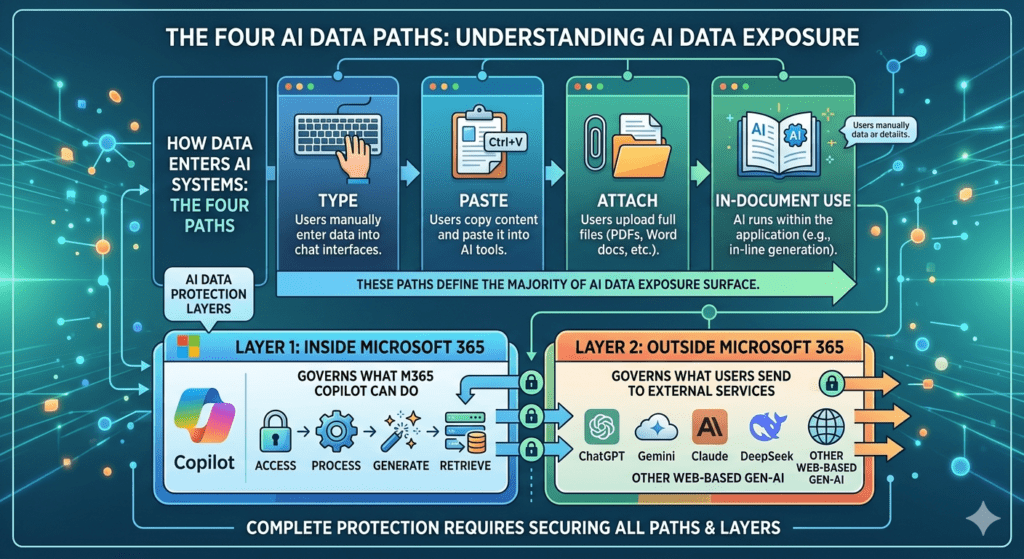
One of the simplest ways to understand AI data protection is to focus on how data enters AI systems. There are four primary paths that define most of your AI data exposure surface:
- Type: Entering text directly into prompt boxes
- Paste: Copying corporate data from documents and pasting it into AI tools.
- Attach: Uploading files, spreadsheets, or images directly into an AI session.
- In-document use: Utilising native AI features embedded directly within applications (e.g., Word, Excel, PowerPoint).
If you do not protect all four paths, critical security gaps will remain.
Mapping Your Defence: The Two Protection Layers
To effectively block data leakage across these four paths, your Microsoft Purview strategy must be deployed in two distinct, overlapping layers. Most organisations focus heavily on one layer while completely neglecting the other. Effective protection requires both.
Layer 1: Inside Microsoft 365 (Internal AI)
This layer governs what internal AI tools, specifically Microsoft 365 Copilot and Copilot chat, can interact with. Your controls must regulate what these services are allowed to:
- Access within your tenant
- Process during a user session
- Generate in response to a prompt
- Retrieve from organisational knowledge bases
Layer 2: Outside Microsoft 365 (External AI)
This layer governs what data your users can send to external, web-based generative AI platforms. Your controls must monitor and restrict interactions with external services such as:
- ChatGPT
- Gemini
- Claude
- DeepSeek
- Other unmanaged web-based AI tools
By aligning the four ingestion paths with these two protection layers, you ensure comprehensive visibility and control over your entire corporate AI footprint.
The Hidden Risk: Oversharing
One of the biggest misconceptions around Microsoft 365 Copilot is that Copilot itself creates exposure.
In reality, Copilot respects existing Microsoft 365 permissions.
The real problem is that many environments already contain significant oversharing.
Common examples include:
- Legacy SharePoint sites with excessive access
- “Everyone except external users” permissions
- Unused Microsoft Teams containing sensitive content
- Poorly governed SharePoint permissions inheritance
- Broad access groups accumulated over years
Before Copilot, much of this content remained effectively hidden because users had to manually search for it.
Copilot changes this dynamic completely.
AI dramatically reduces the effort required to discover, summarise, and reuse information across Microsoft 365.
This means overshared data becomes far easier to expose at scale.
In most environments I assess, this is one of the main causes of Microsoft 365 data oversharing and AI-related data leakage.
Why Classification Matters for AI Security
Before deploying DLP for AI, organisations need a reliable data classification foundation.
Without classification:
- DLP policies become inconsistent
- Sensitive data may be missed entirely
- False positives increase
- User frustration grows
- Security teams lose confidence in enforcement
Sensitivity labels and Sensitive Information Types (SITs) are foundational to effective AI governance.
If your organisation cannot reliably identify sensitive data, your AI controls will not operate effectively.
Classification is not optional.
The Six Microsoft Purview DLP Controls That Matter Most for Copilot and Generative AI
Rather than deploying every available control, focus first on the capabilities that address the most common real-world leakage scenarios.
The six controls below provide a strong minimum viable protection model for AI.
Control 1: Block Sensitive Prompts in Copilot
This is the most important Copilot DLP control for preventing data leakage in prompts.
Licensing: This is the only control available for all licenses.
Prerequisites: Either select from the out-of-the-box Sensitive Information Types (SITs) or configure your own custom SITs
Purpose
Prevent users from entering sensitive information into Copilot prompts.
This is one of the most common AI data leakage paths.
Configuration
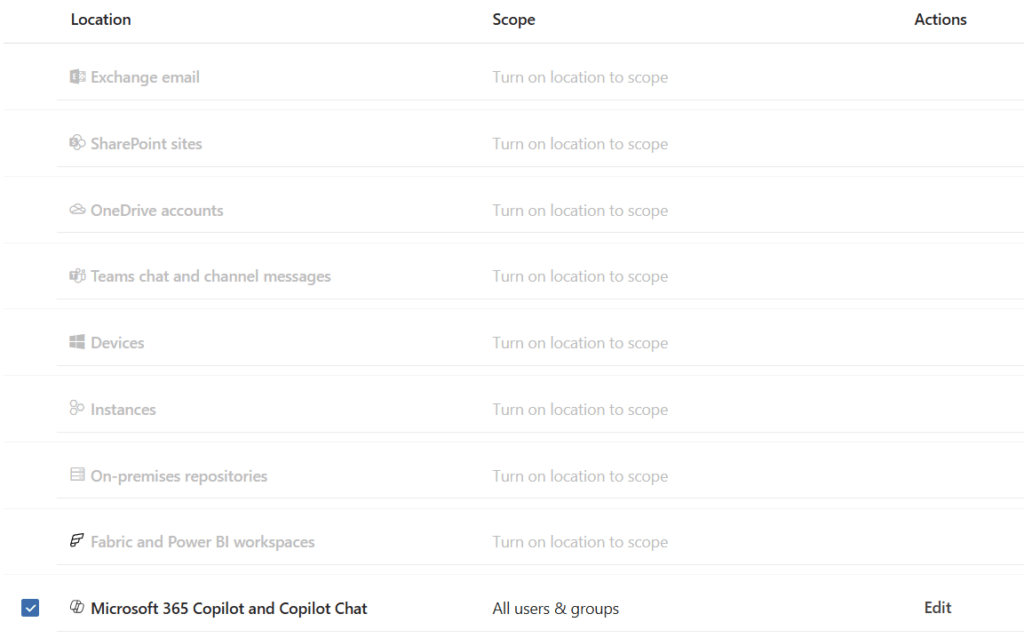
Configure a DLP policy targeting:
- Microsoft 365 Copilot
- Copilot Chat
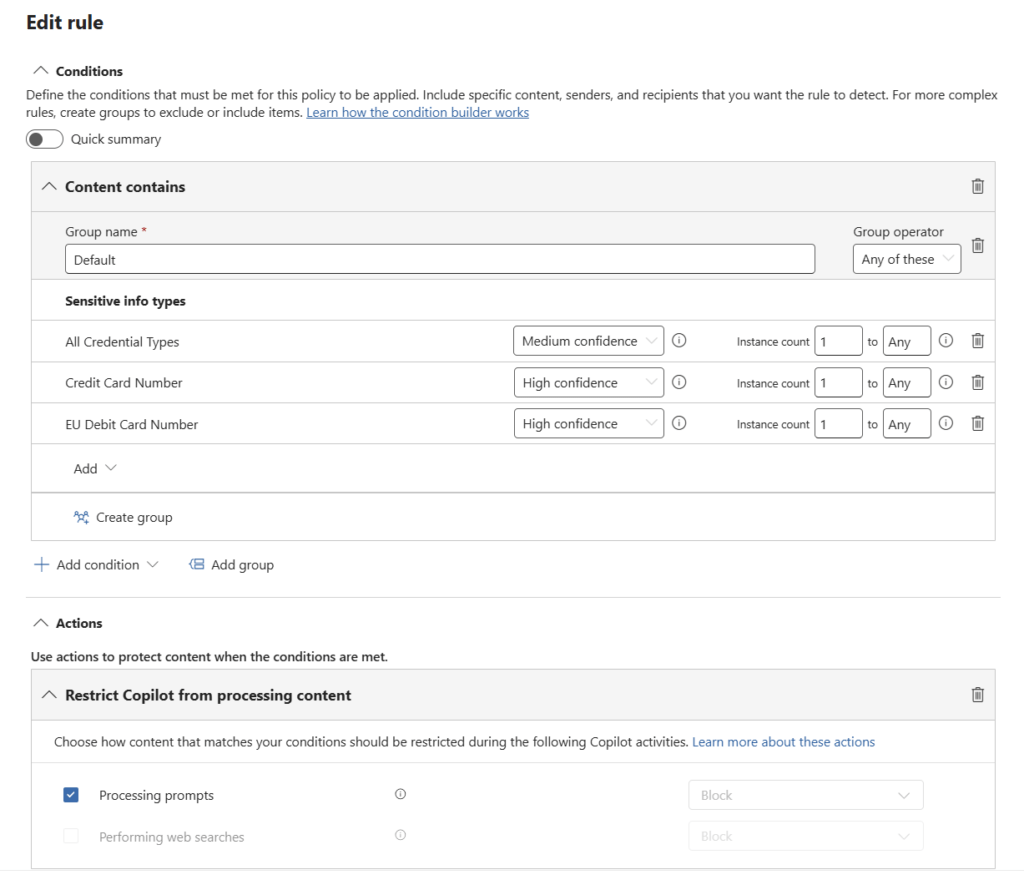
Use conditions such as:
- Content contains one or more SITs
Configure the action:
- Processing prompts = Block
Operational Considerations
Prompt processing and web grounding are separate controls and must be configured as separate rules.
This control is particularly effective for preventing exposure of:
- Personally identifiable information (PII)
- Financial data
- Credentials
- Regulated business data
Recommended Deployment Approach
- Start in audit mode
- Pilot with a limited user group
- Tune SIT detection carefully
- Review Activity Explorer data before broad enforcement
- Communicate clearly with users to reduce confusion
Quick Start
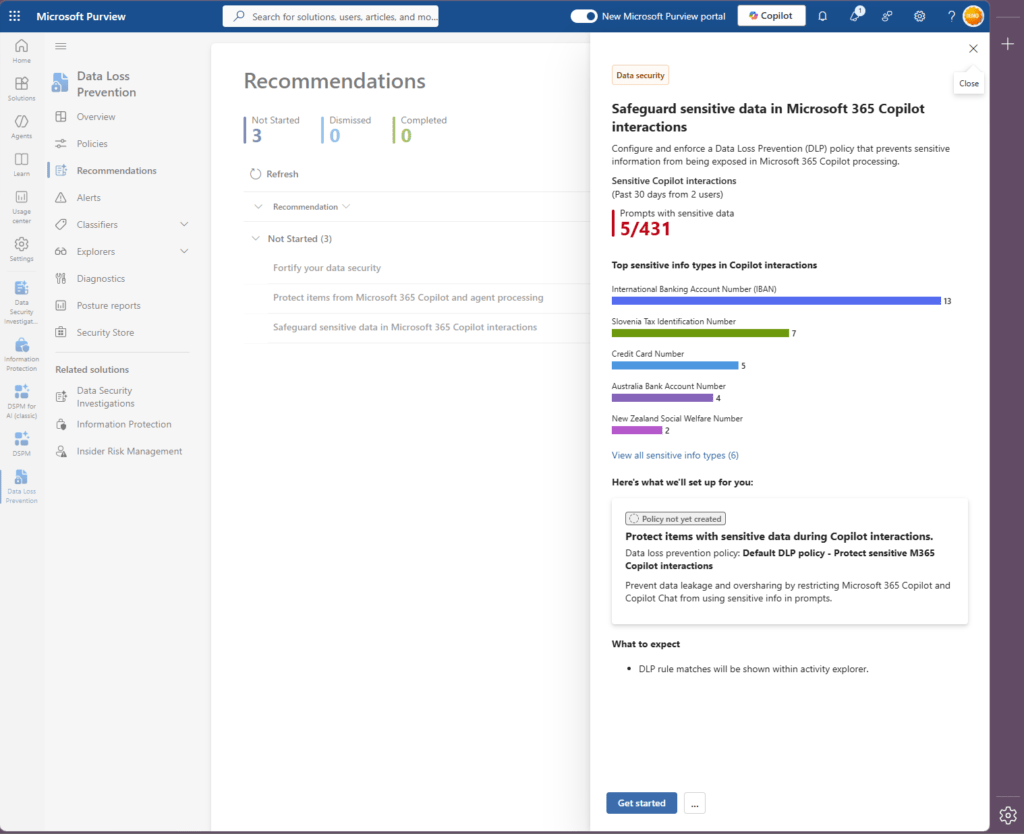
Use the built-in Microsoft Purview recommendation:
“Safeguard sensitive data in Microsoft 365 Copilot interactions”
This provides one of the fastest ways to implement initial protection.
Control 2: Block Web Grounding for Sensitive Prompts
Licensing: Microsoft 365 E5 or Purview add-on for Business Premium / Preview
Prerequisites: Select from the out-of-the-box Sensitive Information Types (SITs) or configure your own custom SITs
Purpose
Prevent Copilot from using sensitive prompts in Bing-powered web grounding.
Web grounding allows Copilot to enhance responses using web search context.
Although Microsoft does not send the entire prompt externally, Copilot may derive summarised search queries from user input. Sensitive data may still be reflected in that process.
Configuration
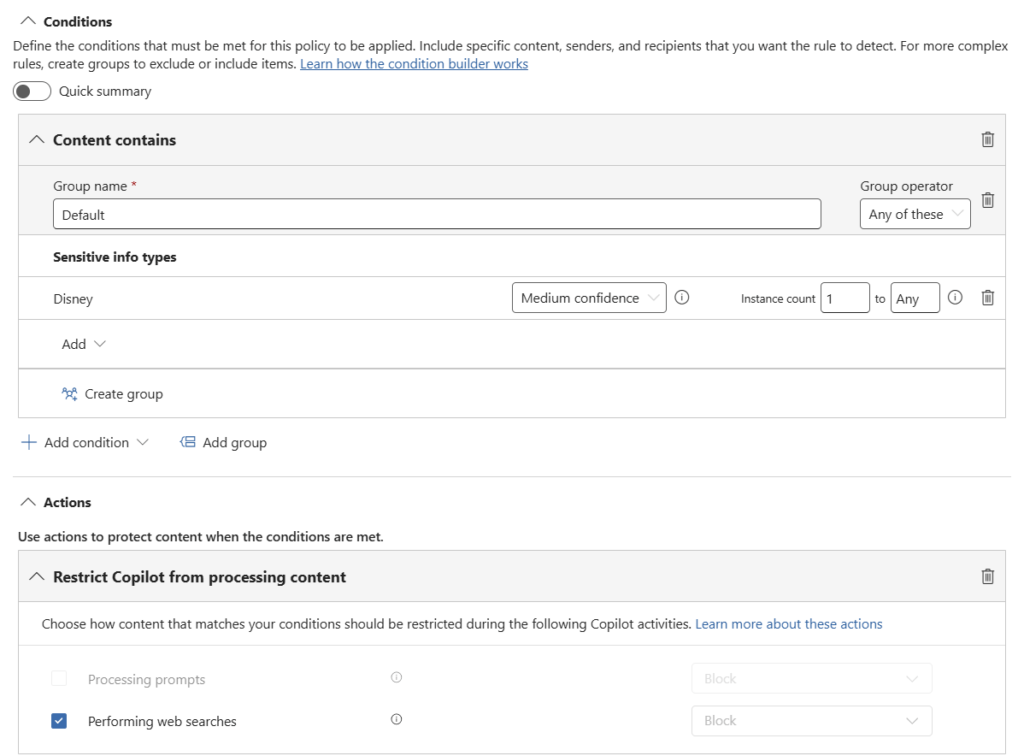
Condition:
- Content contains one or more SITs
Action:
- Performing web searches = Block
Operational Considerations
- Only the Block action is currently supported
- This must be deployed as a separate rule
- Start with high-risk SITs before broad expansion
Recommended Deployment Approach
This control works best when paired with prompt protection policies.
It allows organisations to:
- Retain Copilot functionality internally
- Reduce external exposure risks
- Apply more targeted governance controls
Control 3: Block Copilot Access to Labelled Content
Licensing: Microsoft 365 E5 or Purview add-on for Business Premium
Prerequisites: Purview Sensitivity labels deployed
Purpose
Prevent Copilot from accessing highly sensitive labelled files and emails.
This creates a hard governance boundary around protected content.
Configuration
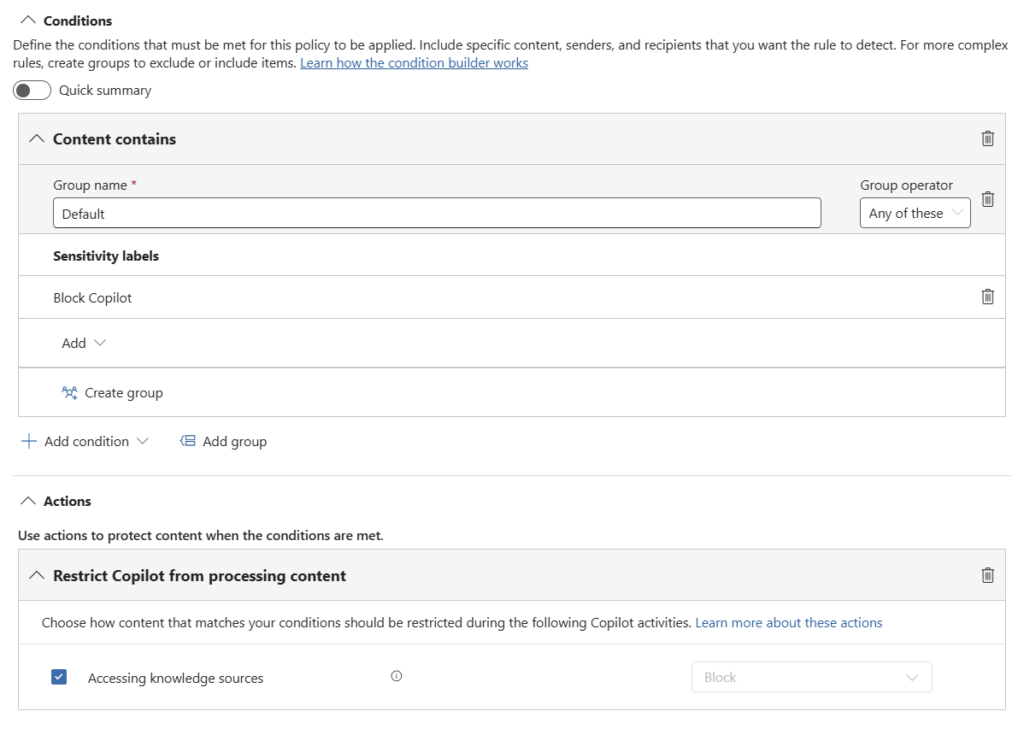
Condition:
- Content contains sensitivity labels
Action:
- Accessing knowledge sources = Block
Operational Considerations
This capability is highly dependent on label maturity and coverage.
Many organisations underestimate how incomplete their labelling strategy is until they begin AI deployments.
A practical approach is to:
- Start with highly confidential labels
- Create dedicated “Exclude from Copilot” labels if required
- Expand incrementally
Recommended Deployment Approach
This is one of the cleanest and most scalable ways to restrict AI access to sensitive business information.
If you can label the content reliably, you can govern Copilot access consistently.
Quick Start
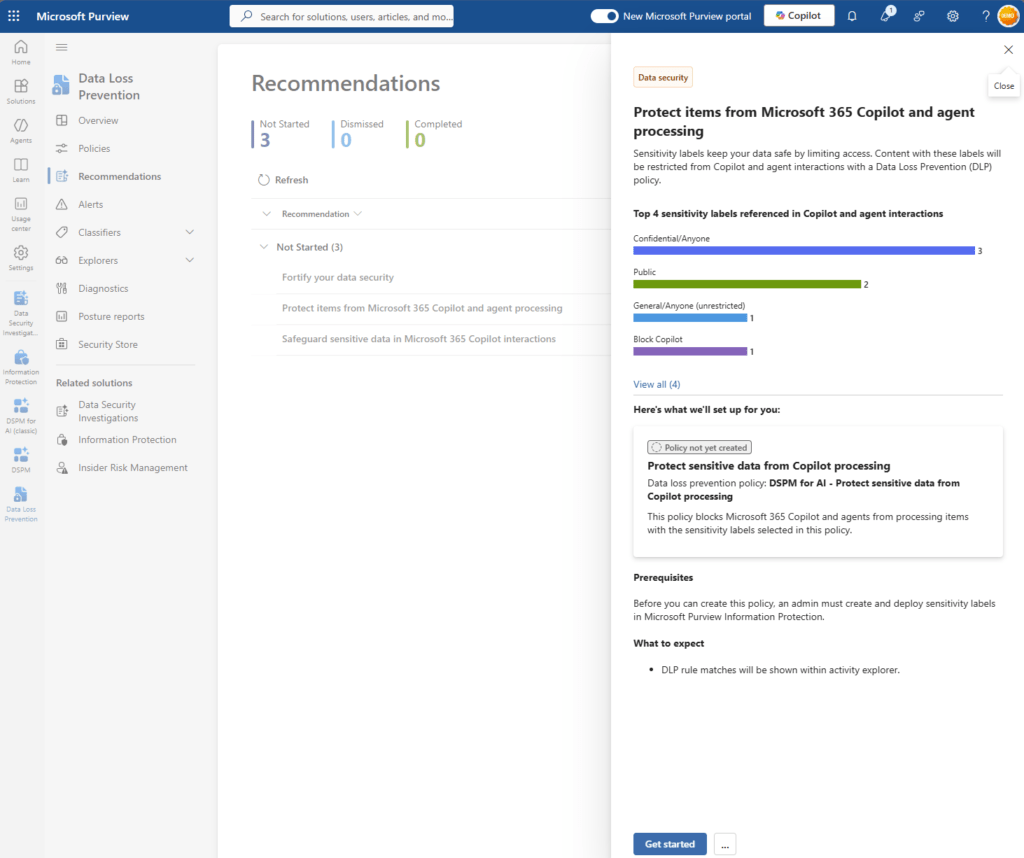
Use the Purview DLP recommendation:
“Protect items from Microsoft 365 Copilot and agent processing”
Control 4: Block Paste and Upload to GenAI Websites
This is a critical Endpoint DLP control for generative AI websites such as ChatGPT.
Licensing: Microsoft 365 E5 or Purview add-on for Business Premium
Prerequisites: Managed devices onboarded to Purview. Select from the out-of-the-box Sensitive Information Types (SITs) or configure your own custom SITs
Purpose
Prevent users from pasting or uploading sensitive data into external generative AI services.
In many environments, this is where the first AI-related data leakage occurs.
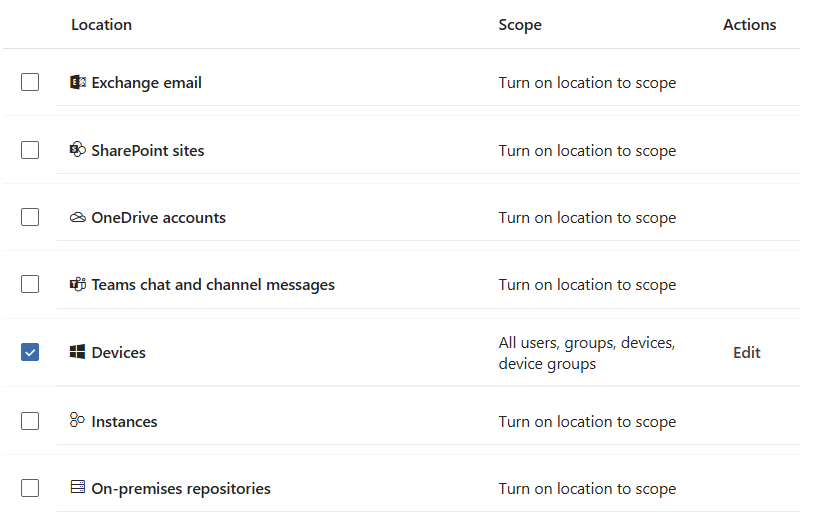
Configuration
Configure Endpoint DLP policies targeting:
- Devices
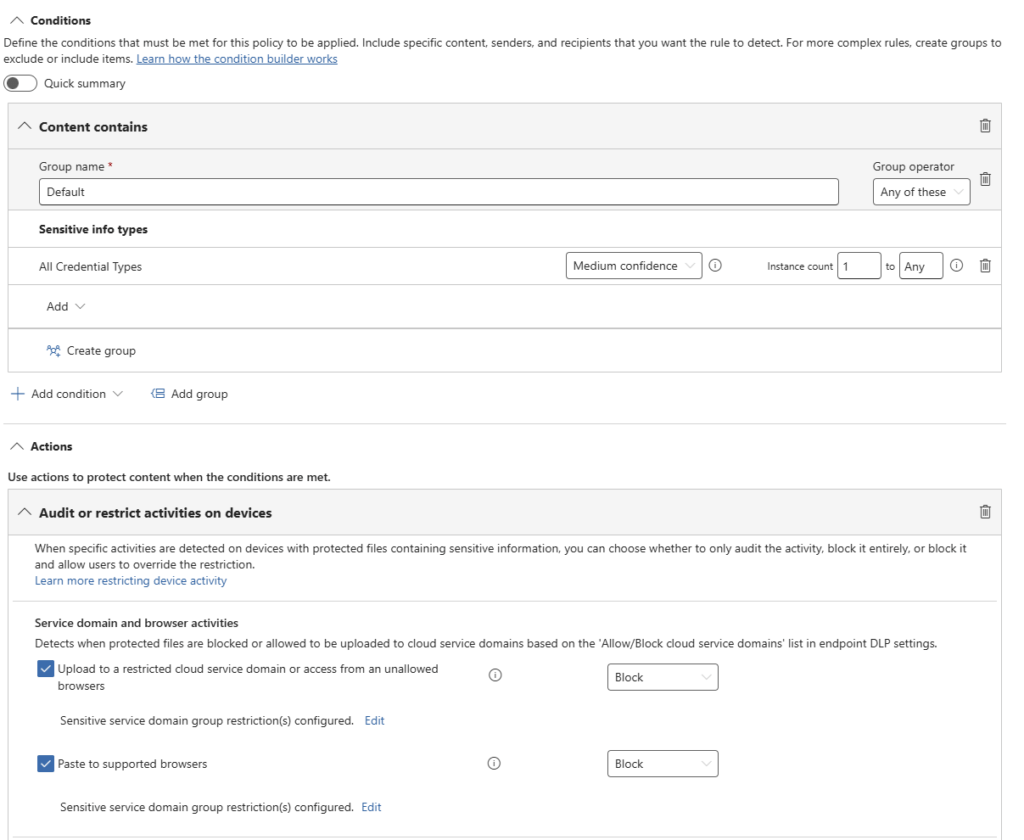
Use conditions such as:
- Content contains one or more SITs
Actions: Audit or restrict actions on devices
- Upload to a restricted cloud domain or access from unallowed browsers
- Paste to supported browsers
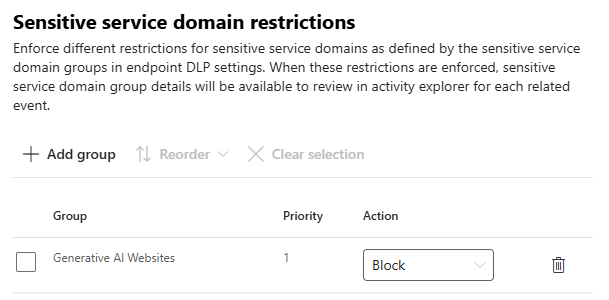
Apply to the Generative AI websites service domain category
Operational Considerations
Browser coverage and enforcement capabilities vary depending on:
- Edge for Business
- Supported browsers
- Defender integration
Organisations should validate behaviour carefully during pilot phases.
Recommended Deployment Approach
- Start with audit mode
- Use pilot groups
- Tune SIT logic aggressively
- Monitor user behaviour patterns before enforcement
If you only secure Copilot but ignore external AI tools, users can bypass internal controls very easily.
👉 In practice, this is where most organisations experience their first AI-related data leak.
Control 5: Block Upload of Labelled Files
Licensing: Microsoft 365 E5
Prerequisites: managed devices onboarded to Purview. Sensitivity labels deployed
Purpose
Prevent labelled files from being uploaded to external AI platforms.
Labels often capture business intent more accurately than content inspection alone.
Configuration
Configure Endpoint DLP policies using:
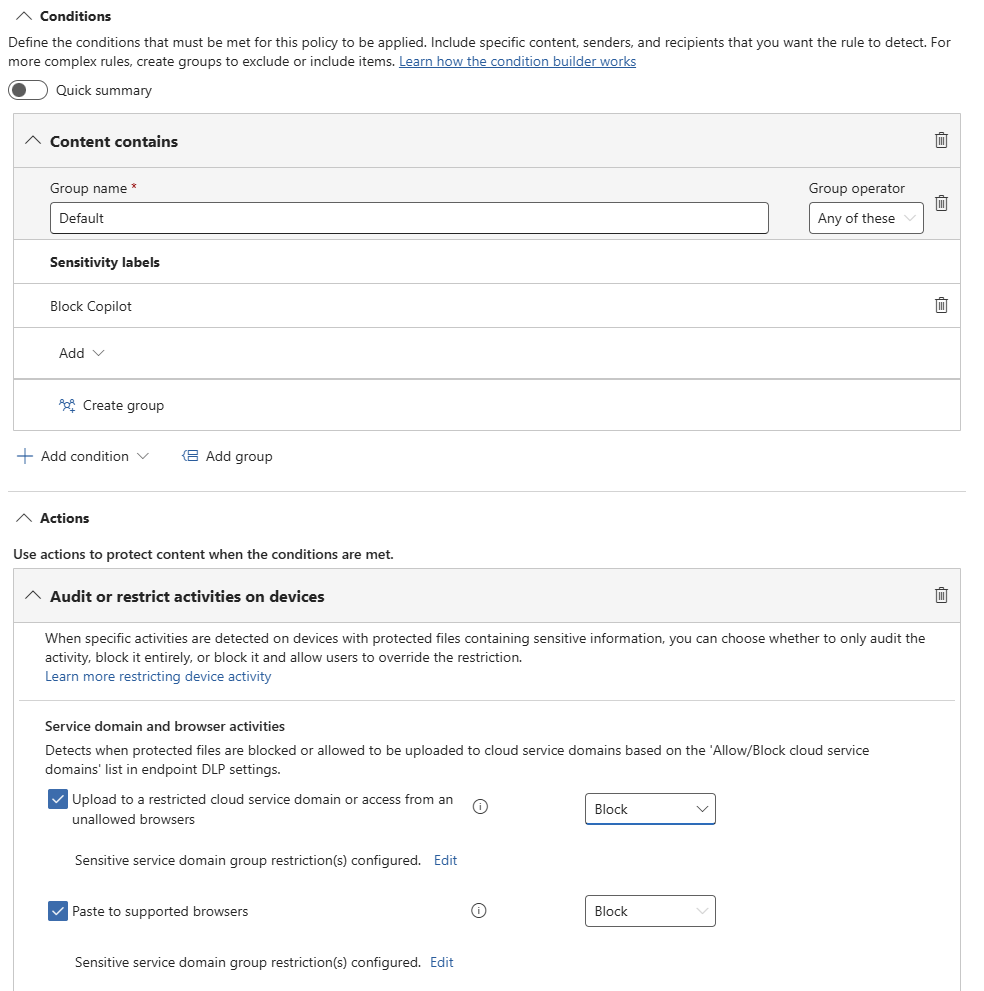
Condition:
- Content has a sensitivity label
Apply restrictions for:
- Upload to restricted cloud service domains
- Access from unallowed browsers
- Paste into supported browsers
Use the:
- Generative AI websites service domain category
Actions:
- Audit
- Block
Operational Considerations
This control complements SIT-based detection extremely well.
It is particularly valuable for:
- Board documents
- Legal material
- Financial reports
- M&A data
- Strategic content
Recommended Deployment Approach
- Combine with SIT-based policies
- Use clear business-aligned label naming
- Align labels directly to risk classifications
- Roll out incrementally
Labels protect scenarios where traditional pattern matching may fail.
Control 6: Inline Data Protection in Edge
Licensing: Microsoft 365 E5 + Microsoft Purview PAYG
Prerequisites: Edge for Business and policy enforcement. Select from the out-of-the-box Sensitive Information Types (SITs) or configure your own custom SITs
Purpose
Provide real-time browser-level DLP enforcement for AI interactions.
Most generative AI usage occurs in the browser, making browser enforcement increasingly important.
Configuration
Deploy:
- Edge for Business
- Microsoft Purview integration
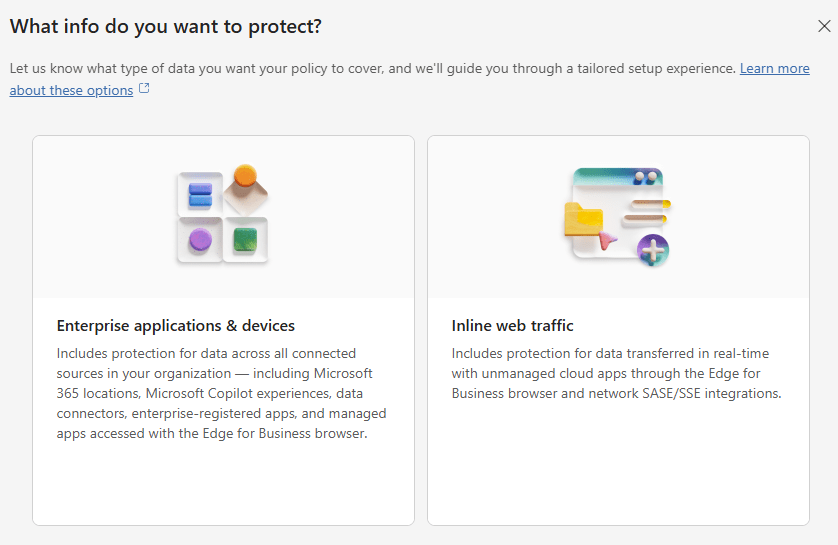
- Inline web traffic policies
Configure:
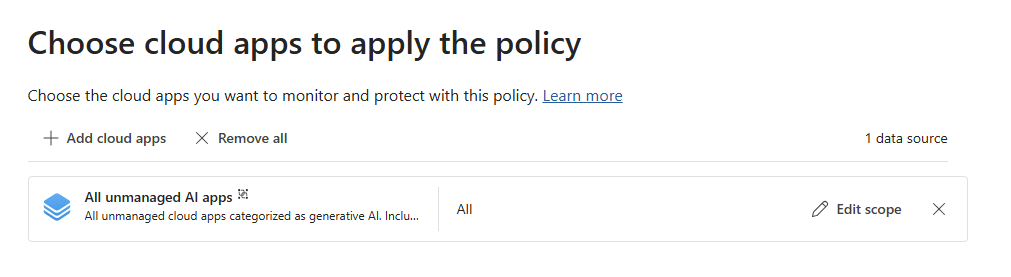
- DLP Policy Type = Inline web traffic
- Enforcement location = Edge for Business
Enable:
- PAYG billing
Operational Considerations
This capability provides some of the closest enforcement to real user AI behaviour.
However, organisations should:
- Monitor PAYG consumption carefully
- Validate browser enforcement scope
- Ensure Edge adoption strategies are realistic
Recommended Deployment Approach
Use this as a layered control alongside Endpoint DLP rather than as a standalone solution.
If AI usage primarily occurs in the browser, browser-level controls become strategically important.
Putting It All Together
The controls naturally divide into two protection layers.
Protecting Microsoft 365 Copilot
- Control 1: Block sensitive prompts (available with all licenses)
- Control 2: Block web grounding
- Control 3: Restrict access to labelled content
Protecting External Generative AI Usage
- Control 4: Block paste and upload
- Control 5: Block labelled file uploads
- Control 6: Inline browser protection
This layered approach ensures Microsoft Purview DLP controls cover both Copilot and generative AI data leakage scenarios.
👉 Most organisations implement Copilot controls first and miss the endpoint layer. That is where the real gap appears.
A Practical Deployment Strategy
Avoid deploying everything at once.
A phased deployment model works far better:
Phase 1: Assess
- Identify oversharing
- Review permissions
- Assess label maturity
- Identify high-risk data locations
Phase 2: Pilot
- Deploy audit policies
- Use limited user groups
- Measure false positives
- Validate operational impact
Phase 3: Tune
- Refine SIT logic
- Improve label coverage
- Adjust policy scope
- Reduce noise
Phase 4: Enforce
- Adapt policies continuously
- Gradually expand enforcement
- Monitor user behaviour
- Review incidents regularly
Monitoring and Optimisation
DLP is not a set-and-forget technology.
Successful AI governance requires continuous monitoring and refinement.
Key capabilities include:
- DLP reporting
- Activity Explorer
- Alerts
- Data Security Posture Management (DSPM)
- Security Copilot investigations
- Custom reporting and analytics
These capabilities help organisations:
- Identify oversharing
- Understand AI interaction patterns
- Prioritise remediation
- Tune controls over time
If oversharing is not addressed, Copilot will surface it.
Licensing and Preview Considerations
Before deployment, organisations should validate:
- Which features are Generally Available (GA)
- Which remain in Preview
- Microsoft 365 E5/ Purview add-on for Business Premium dependencies
- Endpoint DLP prerequisites
- PAYG billing requirements
- Browser enforcement limitations
Preview features may change before general availability and should be tested carefully before large-scale production deployment.
Final Thoughts
AI security is ultimately a data governance challenge.
Microsoft 365 Copilot does not introduce new risks. It exposes what already exists. If data is overshared, poorly classified, or loosely governed, AI will make that visible at speed and at scale.
The organisations that succeed with Copilot and generative AI are not the ones deploying the most controls. They are the ones that:
- Understand where their data is stored
- Reduce oversharing across Microsoft 365
- Classify information in a consistent and meaningful way
- Apply layered protection across internal and external AI
- Continuously monitor and refine their controls
Microsoft Purview DLP can provide effective protection for Copilot and generative AI. However, this only works when it is built on strong data governance foundations.
👉 Effective AI security starts with effective data governance.
Frequently Asked Questions
What is Microsoft Purview DLP for Copilot?
Microsoft Purview Data Loss Prevention (DLP) helps organisations prevent sensitive data from being exposed through Microsoft 365 Copilot.
It enables you to:
Block sensitive data in prompts
Restrict access to sensitive content
Control how data is used in AI responses
Can Microsoft 365 Copilot leak sensitive data?
Yes, but not because Copilot bypasses security.
Copilot respects existing Microsoft 365 permissions. If sensitive data is already accessible, Copilot can surface and summarise it.
👉 The real risk is existing oversharing, not Copilot itself.
What is the biggest risk when deploying Copilot?
The biggest risk is oversharing.
Most environments already contain excessive permissions, legacy SharePoint access, and broadly shared content. Copilot makes that data easier to find and use.
👉 In practice, oversharing is the single largest risk before Copilot is even enabled.
How do you prevent data leakage in Microsoft 365 Copilot?
You need layered controls:
1 Block sensitive prompts using DLP
2 Restrict access to labelled content
3 Review and remediate oversharing
👉 Start with prompt protection, then expand to classification and governance.
How do you stop users sending data to ChatGPT or other AI tools?
Use Endpoint DLP and browser controls to restrict data leaving managed devices.
Key controls include:
1 Blocking paste and upload to generative AI websites
2 Restricting uploads based on sensitivity labels
3 Applying browser-level protection
👉 Without these controls, users can bypass Copilot protections.
Do you need both sensitivity labels and SITs?
Yes.
Sensitive Information Types detect patterns such as PII and financial data
Sensitivity labels reflect business context
👉 You need both for effective and reliable coverage.
Should DLP policies be deployed in block mode immediately?
No.
Best practice is to:
1 Start in audit mode
2 Use pilot groups
3 Tune policies
4 Move to block gradually
👉 Deploying too quickly often leads to false positives and user frustration.
Where should I start with Microsoft Purview DLP?
👉 Block sensitive prompts in Copilot
Then:
Start with Control 1:
👉 Block sensitive prompts in Copilot
Then:
1 Validate behaviour
2 Improve classification
3 Expand to Endpoint DLP
4 Add browser-level controls
👉 You can reduce risk quickly without overengineering your environment.
Need Help?
If you are planning a Microsoft 365 Copilot rollout or broader AI governance programme, now is the time to establish the right foundations.
I help organisations to:
- Identify oversharing risks
- Design Microsoft Purview governance strategies
- Implement practical AI data protection controls
- Improve Microsoft 365 security and compliance maturity
If you want to turn AI governance strategy into an operational deployment, feel free to get in touch.
References
- Learn about using Microsoft Purview Data Loss Prevention to protect interactions with Microsoft 365 Copilot and Copilot Chat | Microsoft Learn
- Learn about the default DLP policy for Microsoft 365 Copilot location | Microsoft Learn
- Help Prevent Users from Sharing Sensitive Info with Cloud Apps in Edge for Business | Microsoft Learn
- Manage generative AI apps for your organization | Microsoft Learn
- Licensing,
View the Slides
Need help governing AI and protecting your data in Microsoft 365?
If you’re working through these challenges in your organisation, I can help.
Nikki Chapple is a dual Microsoft MVP (Microsoft 365 and Security) and Principal Cloud Architect at CloudWay, helping enterprises reduce data exposure, prevent data loss, and manage AI risk across Microsoft 365. More about Nikki.
She co-hosts the AI Governance and Data Security Show with Ryan John Murphy, helping organisations securely adopt AI, govern data, and manage generative AI risk.
📺 YouTube · 🎧 Spotify · 🎧 Apple · 🔗 LinkedIn