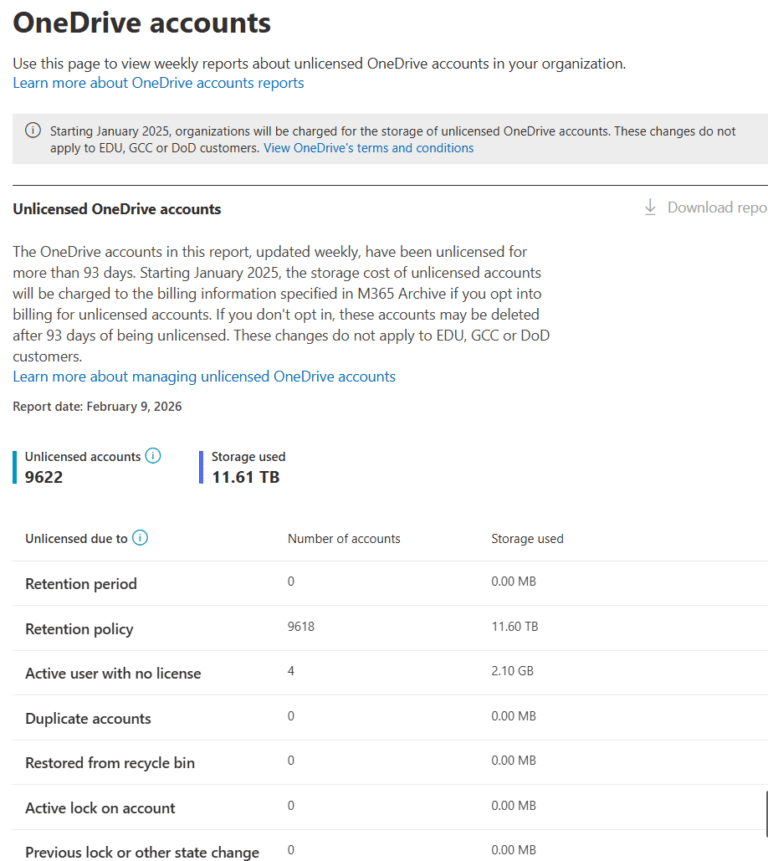
Ex-employee OneDrive retention is no longer primarily a licensing problem. Since January 2025, Microsoft has reduced one of the biggest historical causes of indefinite OneDrive retention. However, many organisations are still retaining former employees’ OneDrive data for years, sometimes indefinitely.
The reason is governance design.
This article explains how identity lifecycle, OneDrive service behaviour, and Microsoft 365 retention (via Microsoft Purview) interact today; why ex‑employee OneDrive data can still persist indefinitely; and how to design retention so every leaver’s OneDrive reaches a predictable, auditable end‑of‑life.
👉 Read the full guide to understand why ex‑employee OneDrive data can still be retained forever, and how to fix it.
Why Ex-Employee OneDrive Retention Is Still a Risk
From January 2025 onwards, Microsoft introduced new enforcement rules for unlicensed OneDrive accounts. These changes addressed the long‑standing issue where a removed licence resulted in a OneDrive that remained active, and often retained indefinitely.
What changed in January 2025
If OneDrive archive billing is not enabled
- An unlicensed OneDrive becomes read‑only at day 60
- Is archived at day 93
- At which point it enters the standard deletion process. However, this deletion still honours Microsoft 365 retention policies and any eDiscovery or litigation holds, which can delay or prevent deletion.
If archive billing is enabled
- The OneDrive is archived at day 93
- And retained indefinitely. It remains inaccessible to users and admins unless reactivated, but is still fully governed by retention and holds
This enforcement removed one of the biggest historical causes of indefinite OneDrive retention, the ability for unlicensed accounts to sit untouched forever. But it did not eliminate the risk of long‑term over‑retention for departed users.
Today, indefinite retention typically occurs when:
- Licences are removed but user accounts are not deleted
- Microsoft 365 retention (Purview) is configured as Retain‑Only
- eDiscovery or litigation holds remain in place
- Retention scopes mix active users and leavers, causing mis‑scoping
Microsoft 365’s design intentionally prioritises preservation over deletion unless every control layer, identity, service lifecycle, retention, and holds, explicitly allows deletion. Without clear governance alignment, the default outcome is still indefinite preservation, not disposal.
From a regulatory perspective, this directly impacts data minimisation, storage limitation, and purpose limitation obligations, creating unnecessary exposure for Legal, Privacy, and Information Security teams.
Real-World Example: When OneDrive Retention for Departed Users Goes Unnoticed
During a recent Microsoft 365 governance assessment, we saw how easily ex‑employee OneDrive retention can persist, even with the 2025 enforcement changes and modern Microsoft 365 retention controls in place. Despite these improvements, the organisation was still retaining leavers’ data for years.

What we found:
- Over 9,000 unlicensed OneDrive accounts
- Approximately 11.5 TB of retained content
- Accounts dating back to 2021
- A tenant‑wide Retain‑Only policy applied to all OneDrivesArchive billing was not enabled
What this meant in practice
Offboarding typically removed the user’s licence, but did not delete the user account. As a result:
- By day 60, each OneDrive became read‑only
- By day 93, each OneDrive was archived as an unlicensed account
- Because a Retain‑Only Microsoft 365 retention policy never issues a delete instruction, Microsoft 365 had no authorisation to delete items
- With no deletion signal and billing disabled the archived OneDrives remained preserved indefinitely instead of progressing through the deletion lifecycle
Nothing was “broken.” The OneDrive service lifecycle, Microsoft 365 retention configuration, and preservation logic were all working exactly as designed.
But the end‑of‑life processes for leavers’ data, had never been intentionally designed, resulting in silent long‑term over‑retention.
How Microsoft 365 Decides Whether OneDrive Data Will Be Deleted For Leavers
Deletion is controlled by three independent systems, each with its own rules and timers:
- Identity lifecycle (Entra ID)
Licence removed versus user deleted. - OneDrive service lifecycle
Active to read-only, archived, and deleted states. - Microsoft Purview compliance
Retention policies and eDiscovery or litigation holds.
These systems are deliberately independent. Microsoft does not infer deletion intent from inactivity, licence removal, or employment status.
Unless all three layers allow deletion, OneDrive data is preserved.
The OneDrive Lifecycle You Must Design Around
Licence Removed (User Not Deleted)
Prior to January 2025, removing a user’s licence did not initiate deletion. The OneDrive was retained indefinitely.
From January 2025 onwards:
- Day 0 to 60: OneDrive operates normally
- Day 60: OneDrive becomes read-only
- Day 93: The site is archived and a deletion pathway is determined by billing and retention/holds
- If OneDrive archive billing is not enabled, the unlicensed OneDrive is enters the standard deletion process at day 93, unless retention policies or holds block deletion
- If OneDrive archive billing is enabled, the OneDrive is placed into an archived state and retained indefinitely, subject to retention and holds.
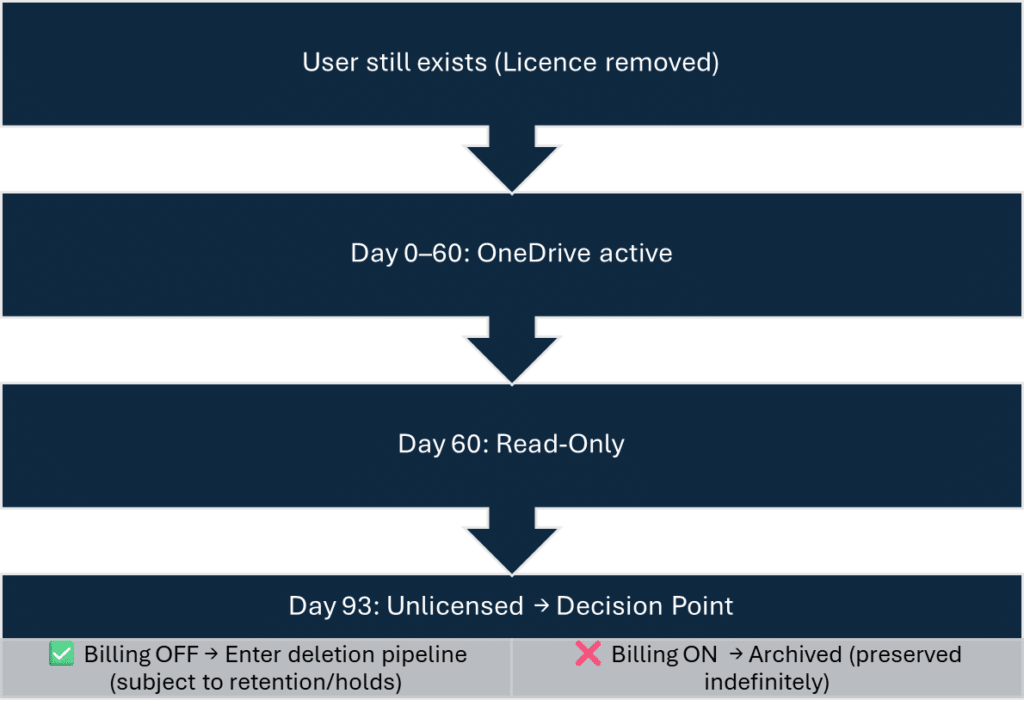
Licence removal alone no longer guarantees indefinite retention, but billing and retention configuration now determine the outcome.
Archived OneDrive Behaviour And Billing
An archived OneDrive:
- Is not deleted – the content remains preserved
- Is not accessible to users or administrators unless it is reactivated
- Remains discoverable in Microsoft Purview eDiscovery, including search and export workflows
- Continues to be governed by retention policies, retention settings, and any eDiscovery or legal holds
When archive billing is enabled:
- Reactivation does not override retention policies or legal holds, these controls remain fully in force
- It applies tenant‑wide to all unlicensed OneDrive accounts
- The archived OneDrive storage is billed monthly
- Administrators can temporarily restore access for up to 30 days by paying a reactivation fee
- Administrators can manually delete archived OneDrive accounts if they are not subject to retention holds
- eDiscovery export of archived content remains available in Microsoft Purview; manual reactivation is not required for export
User Account Deleted (The Critical Event)
Deleting the user in Entra ID is still the only identity action that starts the OneDrive cleanup lifecycle.
- The deleted-user OneDrive retention period begins (default 30 days, configurable up to 3,650 days)
- Manager or secondary owner granted access to remove business content (configurable)
- After this period, the OneDrive enters the SharePoint recycle-bin and permanent deletion flow
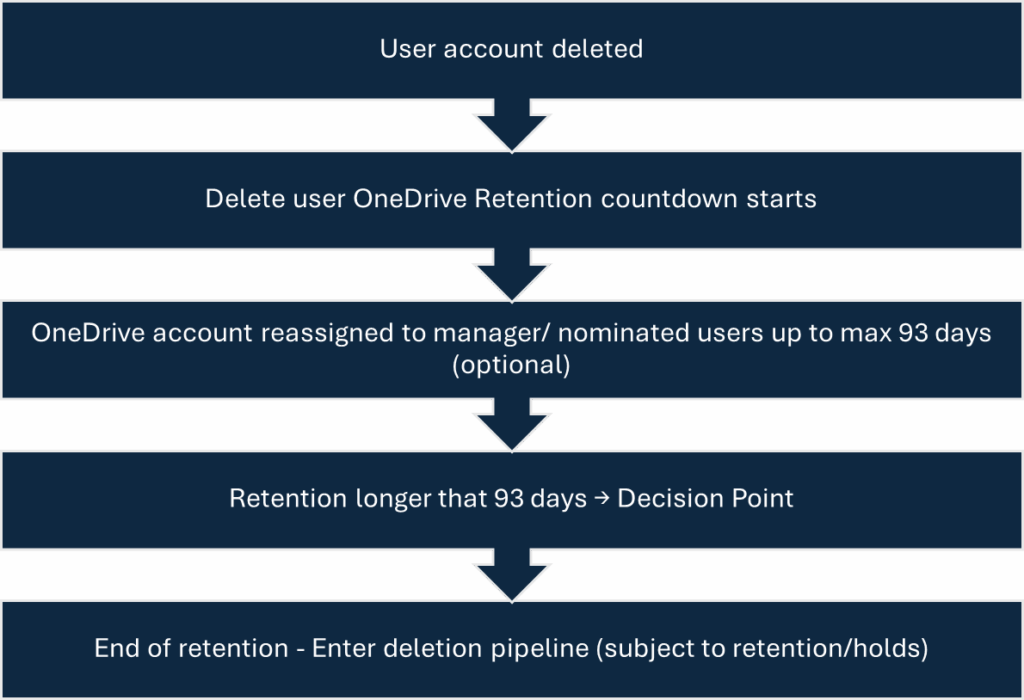
If retention or holds block deletion, the OneDrive remains preserved even after user deletion.
How Microsoft Purview Retention Still Causes Indefinite OneDrive Retention
Retention in Microsoft Purview is Item-Level, not site-level. This distinction is critical for ex-employee OneDrive retention.
Retain-Only – Preservation Without A Delete Instruction
Retain-Only policies:
- Preserve files for the retention period.
- Do not issue a delete instruction when the period ends.
For OneDrive, this means:
- Deleted or archived OneDrives can persist indefinitely.
- The OneDrive lifecycle never completes.
- Ex-employee data has no predictable deletion date.
This is now the primary cause of indefinite OneDrive retention for departed users.
Retain-and-Delete – Predictable Lifecycle Completion
Retain-and-Delete policies:
- Preserve items for a defined period.
- Delete items automatically at expiry.
- Allow OneDrive to complete deletion once holds are cleared.
This is the only retention model that supports a defensible, auditable end-of-life for leaver OneDrive data.
eDiscovery And Litigation Holds
Holds override all other controls.
- Nothing deletes while a hold exists.
- This applies regardless of licence state, billing, or retention expiry.
- Deletion resumes only when the hold is removed.
Holds delay deletion – they do not replace lifecycle design.
What Actually Happens In Common Leaver Scenarios
Leaver outcomes are determined by billing, retention, holds, and whether the user was deleted.
| Leaver Scenario | Outcome |
|---|---|
| Licence Removed + User Not Deleted+ No Retention | Day‑60 read‑only Day‑93 decision: •billing OFF ➜ enters deletion pipeline (subject to retention/holds) • billing ON ➜ archived |
| Licence Removed + Retain-Only | ⚠️ Archived at Day‑93 and preserved indefinitely (no delete instruction is ever issued) |
| Licence Removed + Retain-And-Delete | Items delete at expiry ; OneDrive completes lifecycle (unless a hold exists) |
| User Deleted + No Retention | Cleanup starts → after deleted‑user retention, OneDrive follows recycle‑bin → permanent deletion |
| User Deleted + Retain-Only | ⚠️ Deletion event occurs but no delete instruction at expiry → long‑term preservation (Preserved indefinitely) |
| User Deleted + Retain-And-Delete | Items delete at expiry ; OneDrive completes lifecycle (unless a hold exists) |
| Any Scenario With A Hold | ⚠️ No deletion until hold removed |
How To Fix OneDrive Retention for Departed Users Risk
1. Treat User Deletion As A Governance Control
- Licence removal is not offboarding. Only user deletion starts cleanup
- Check exposure in SharePoint admin centre → Reports → OneDrive accounts → Unlicensed
- Set a mandatory deletion timeframe (e.g. within 7–14 days of termination) and monitor it
2. Segment Retention By User State
- Active users: apply Retain‑Only.
- Leavers: apply Retain‑and‑Delete.
- Ensure scopes are mutually exclusive (Adaptive Scopes if available).
3. Actively Manage Holds
- Review long‑running eDiscovery/Litigation holds on leavers.
- Keep justification up to date; remove holds when no longer required.
4. Tidy up archived/unlicensed OneDrives
- Use the Unlicensed OneDrive report to identify accounts and size.
- Delete where no retention/hold applies, or transfer required business content.
- Decide if archive billing is justified; track monthly cost and any reactivations.
Governance Models For Lifecycle Completion
| Feature | Model A (Adaptive Scopes, E5) | Model B (Manual lifecycle) |
|---|---|---|
| Automation | High | Manual |
| Scoping accuracy | High | Medium |
| Admin effort | Low | Higher |
| Licensing | Requires E5 Compliance | Works with E3 |
| Typical users | Large/regulatory environments | Cost‑sensitive or simpler setups |
| Reliability | Very high | Good with process discipline |
| Risk of mis‑scoping | Low | Higher |
| Outcome for leavers | Consistent, defensible lifecycle | Predictable if steps followed |
Model A: Automated Lifecycle (Adaptive Scopes, E5)
Best for large, complex, or heavily regulated organisations
Adaptive Scopes allow Microsoft Purview to automatically identify users based on directory attributes, such as employment status, organisational unit, department, or custom attributes. This removes the need for manual scoping and ensures users move through the retention lifecycle consistently.
How Model A works
- An Active Users Adaptive Scope includes all current employees.
- A Leavers Adaptive Scope includes users whose accounts have been deleted or moved into a leaver state in Entra ID. (For example if you also have retention policies on the user mailbox use “IsInactiveMailbox” True or False in the adaptive scope query)
- Two retention policies are applied:
- Retain‑Only for Active Users
- Retain‑and‑Delete for Leavers
- When a user is deleted, they are automatically removed from the Active scope and added in the Leavers scope.
- Their OneDrive immediately moves from the Retain‑Only policy to the Retain‑and‑Delete policy, ensuring a predictable end‑of‑life.
Why Model A works well
- Eliminates manual scoping errors
- Automatically adapts as users move through the identity lifecycle
- Reduces long‑term administrative overhead
- Ensures consistent, defensible retention outcomes for all leavers
Model B: Manual Lifecycle
Best for organisations without E5 licensing or those with simpler environments
Model B relies on administrative processes and policy hygiene rather than automation. It works effectively but requires discipline and documented offboarding steps.
How Model B works
- Remove the user from all Retain‑Only policies
– A Retain‑Only policy will block deletion even after the user account is deleted. - (Recommended) Add the user to a Leaver Retain‑and‑Delete policy
– This gives the OneDrive a defined retention period and a definitive deletion outcome. - Wait for retention policy updates to apply
– Allow time (up to 7 days) for policy propagation across the Purview platform. - Delete the user account
– This is essential. User deletion is the only event that triggers OneDrive cleanup. - Deletion proceeds subject to retention and holds
– If the user is on a legal hold or eDiscovery case, the OneDrive will remain preserved until the hold is removed.
Why Model B works
- No E5 compliance licensing required
- Retention outcomes remain predictable as long as the process is followed
- Provides granular administrative control
Risks to manage
- Higher chance of mis‑scoping
- Requires consistent offboarding processes
- More prone to human error compared to Model A
A detailed implementation guide for Model B, including recommended policy structures, sequencing, and offboarding checklists, will be covered in the next blog.
Quick 10‑Minute Check
Ask:
- Do you delete users, or only remove licences?
- Do retain‑only Purview Retention policies apply to leavers?
- Are archived OneDrive accounts accumulating (check the Unlicensed OneDrive report: SharePoint admin centre > Reports > OneDrive accounts)?
- Do retention policies overlap active users and leavers?
- Are there long‑running holds?
- Is archive billing enabled, and is that intentional?
Multiple “yes” answers indicate elevated risk.
FAQ: Ex-Employee OneDrive retention
Does archived OneDrive data still count as personal data?
Yes. Archived OneDrive data remains personal data under GDPR because it is preserved, discoverable, and recoverable (subject to configuration).
Inaccessibility does not remove regulatory obligations.
Did Microsoft fix indefinite OneDrive retention in January 2025?
Partially. Microsoft removed automatic indefinite retention for unlicensed OneDrive accounts when archive billing is not enabled. Retain-Only Purview retention policies and holds can still cause indefinite retention.
What is now the biggest cause of indefinite OneDrive retention?
Microsoft Purview retention configured as Retain-Only for leavers.
Does eDiscovery Require Restoring Archived OneDrives?
No. Archived content remains searchable and exportable in Microsoft Purview without manual reactivation.
Why Not Rely On Backups Instead Of Retention Policies?
Backups support disaster recovery, not lawful data lifecycle management. Microsoft Purview retention provides time-bound, auditable deletion.
Who should own decisions about ex-employee OneDrive retention?
This should be a joint decision between Legal / Privacy, Information Security and IT / Microsoft 365 administrators.
Leaving it solely to technical teams often results in silent over-retention.
What is the single most important action to take?
Ensure user accounts are deleted as part of offboarding and that leavers are assigned Microsoft 365 retention policies with a Retain-and-Delete action.
The Governance Reality
Microsoft 365 will retain data indefinitely unless you design an explicit end-of-life.
The January 2025 lifecycle change reduced one major risk, but governance design decisions still determine whether ex-employee OneDrive data is deleted or preserved forever.
Good governance is not about keeping everything “just in case”.
It is about ensuring every ex-employee’s data has a justified, documented, and enforceable deletion outcome.
More Information
- Microsoft 365 Retention Archive And Backup Strategies Explained
- How To Use Microsoft 365 Retention Policies And Labels
Microsoft References
- OneDrive retention and deletion – SharePoint in Microsoft 365 | Microsoft Learn
- Manage unlicensed OneDrive user accounts – SharePoint in Microsoft 365 | Microsoft Learn
- Delete a user from your organization – Microsoft 365 admin | Microsoft Learn
- Learn about retention for SharePoint and OneDrive | Microsoft Learn
Need help governing AI and protecting your data in Microsoft 365?
If you’re working through these challenges in your organisation, I can help.
Nikki Chapple is a dual Microsoft MVP (Microsoft 365 and Security) and Principal Cloud Architect at CloudWay, helping enterprises reduce data exposure, prevent data loss, and manage AI risk across Microsoft 365. More about Nikki.
She co-hosts the AI Governance and Data Security Show with Ryan John Murphy, helping organisations securely adopt AI, govern data, and manage generative AI risk.
📺 YouTube · 🎧 Spotify · 🎧 Apple · 🔗 LinkedIn